Every family with kids and screens knows the loop: “Have you done your chores?” → negotiation → resentment → repeat. We lived that loop for a while. The chores got done eventually, but every single time it cost a conversation, and the conversation was always the same fight about fairness.
So I built a system to make doing chores feel like a game you want to play — not a lecture with a spreadsheet. It’s been running daily in our house for months. This post is the full story: what I built, the design decisions that mattered, the things that broke, and how you could replicate it.
The design brief
Before writing any code, I wrote down what the system had to do:
- Instant feedback. The moment a chore is done, something visible and audible happens. No “I’ll add it to the chart later” — the gratification is the point.
- Visible progress. Kids can see their balance, their streak, and what they’re saving for, any time they look at the tablet.
- Surprise. A fixed reward chart gets stale in a week. There has to be an element of “what’s today’s bonus?”
- A shared goal. Chores are a family thing, so the system should make everyone rooting for everyone.
- No negotiation. The rules are set by the parent in an admin panel, not re-litigated at chore time. The system is the authority, so I don’t have to be the bad guy.
That last one turned out to be the most important. The moment the rules stopped being a conversation, the arguments stopped being about the rules.
How it works
Here’s the whole system in one sentence: a kid finishes a chore, taps an NFC tag stuck to the thing they cleaned, and the house announces it while their points tick up on the tablet.
The pieces:
- The tags. Each chore has an NFC tag. The tags are cheap and passive — no batteries, just a sticker you tap.
- The scanner. An ESP32 with a PN532 NFC reader, mounted in the kitchen, running ESPHome firmware. Tap a tag, and the firmware reads the UID.
- Home Assistant. The scanner reports the tag UID to HA as a
tag_scannedevent. An automation picks it up and calls the chore system’s API. - The backend. FastAPI + SQLite on a homelab container. It knows every kid, chore, tag, point, streak, quest, and reward. It decides what a scan means — login, chore completion, or nothing.
- The feedback. On a scan, the backend broadcasts over a WebSocket and the kid-facing tablet dashboard updates instantly — points animate, SFX plays, the house speakers announce it.
The theming
Every kid-facing surface is skinned — the login screen, the dashboard, the sounds, even the words for “points” and “streak” change with the theme. The themes rotate weekly, and this week the whole house is Space Academy: points are energy, streaks are missions, and the login screen sits in the cockpit of a ship, looking out at a nebula. The background is a looping video:
The themes rotate weekly, and this week the whole house is Space Academy: points are energy, streaks are missions. On Monday morning the kids race to the tablet to see what the new theme is.
The theming isn’t decoration; it’s a retention mechanism. Novelty keeps the system interesting long after the points would have gone stale.
The game design
Points alone get boring. The engagement layer is where most of the design work lived:
- Bonus quests (2× points). Every day, one chore is secretly picked as the bonus. The login screen announces it: “Today’s bonus quest is Make Bed — double points!” The dashboard highlights it with a pulsing badge. The kids race for it. It’s a variable reward — you never know which chore it’ll be, and that unpredictability is the hook.
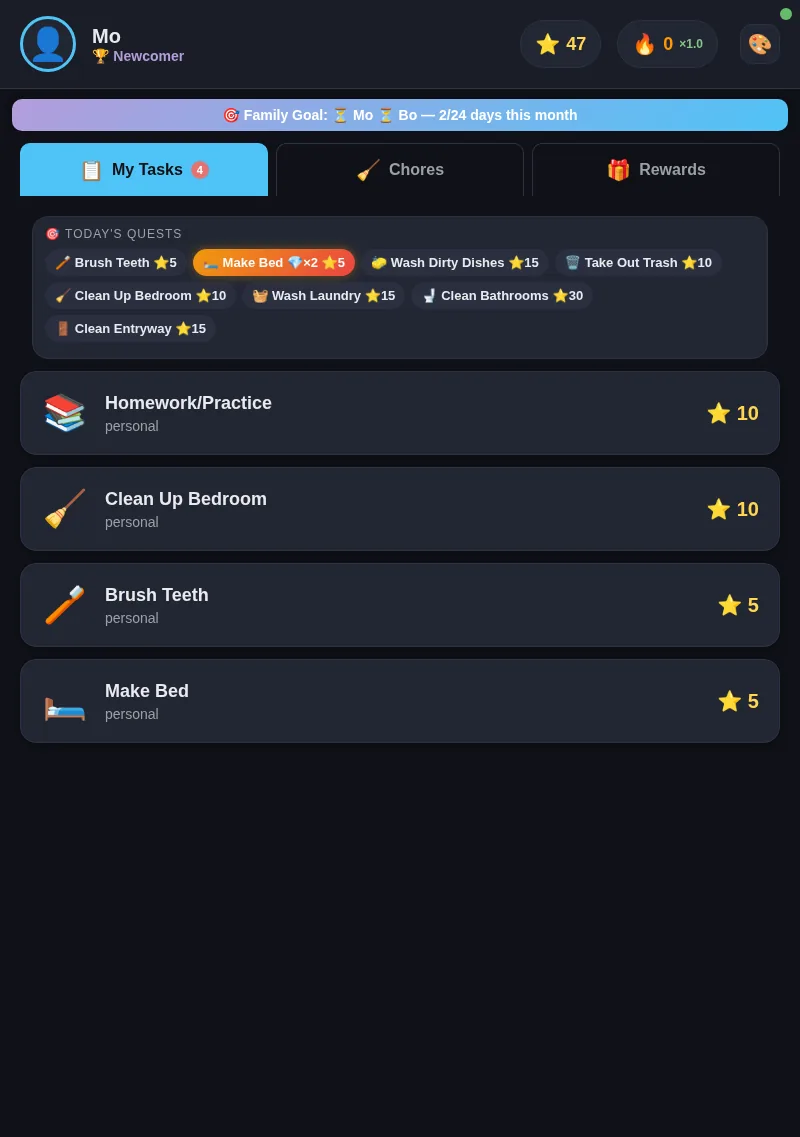
- Streaks and ranks. Completing a chore on consecutive days builds a streak; crossing thresholds promotes you through themed ranks — at Space Academy, Cadet → Pilot → Commander → Admiral. Status is a hell of a motivator at 8 years old.
- Family goals. When everyone completes at least one chore in a day, the whole family gets a celebration. It turns chores from “my work” into “our thing” — and the dashboard shows each kid’s status so they cheer each other on instead of me nagging them.
- Screen-time gate. This is the one that actually changed the house. The tablet won’t unlock screens until a chore is done, and the gate has a configurable cutoff. Screens are now earned by the system, not negotiated with me. The fight simply disappeared — I’m not the enforcer, the system is.
The admin side
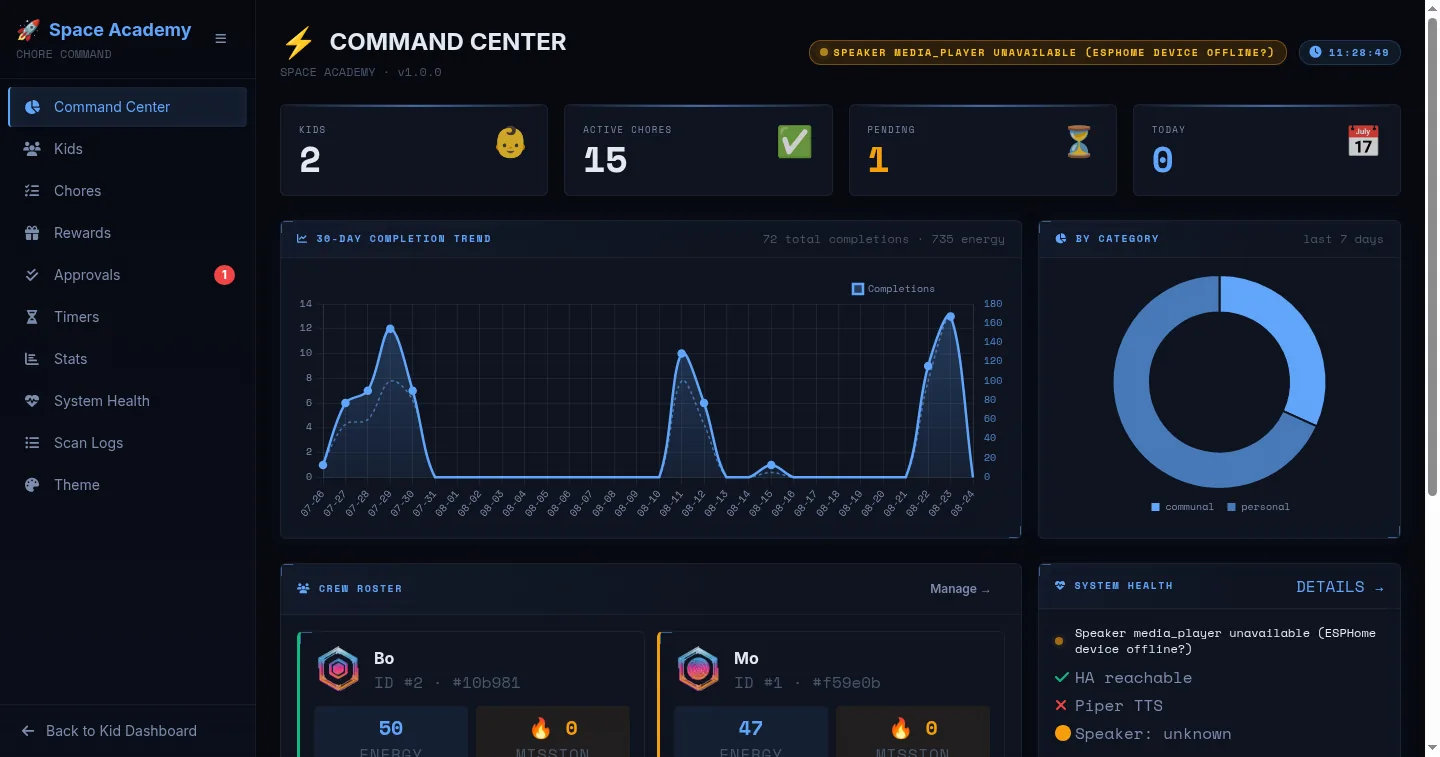
A system that runs a household needs to be operable in 30 seconds. The admin panel shows the whole state at a glance: per-kid balances, the 30-day completion trend, the chore catalog, the scan log, and system health — all live, all the same data the kids’ tablet reads.
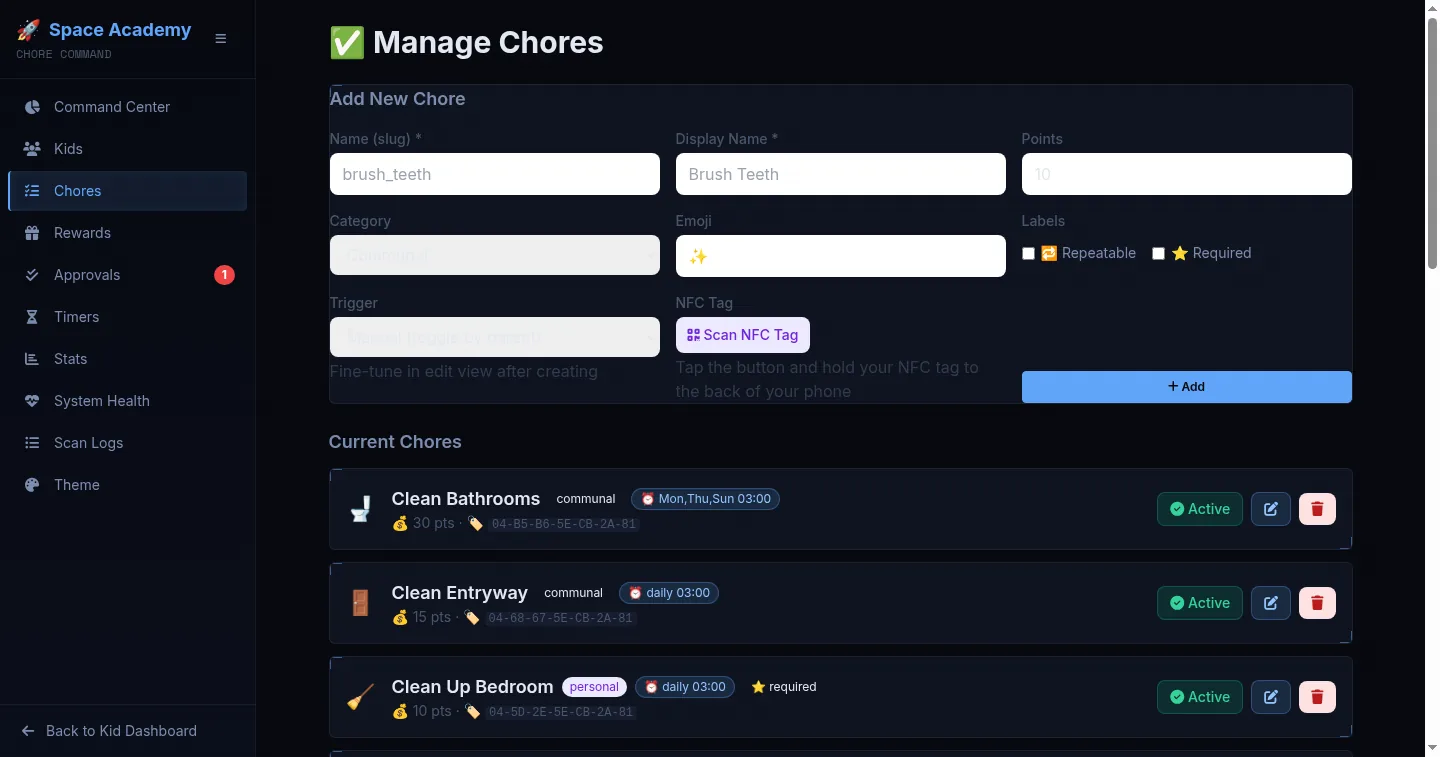
Every chore has a name, an emoji, a point value, a category, a schedule, and its own NFC tag. Chores can be paused without deleting them, and new ones are added by tapping a tag with a phone.
The numbers so far
The system has logged 1,137 scans — real usage data, not a demo. In the last 30 days: 72 chore completions, 735 points earned. Both kids are mid-quest right now, and one has points sitting in escrow, saving up for a reward. The system outlived the novelty phase — which is exactly what I’d have bet against before building it. When something feels off at 7 a.m., the scan log and the dashboard API are the same codebase, so “what happened?” is one query away.
What broke (the honest part)
Real systems break, and this one did, in instructive ways:
- The scanner hung for a week. The ESP32’s WiFi dropped and the firmware
had no watchdog, so it sat there dead while the kids dutifully tapped tags
at a brick. Root cause: brownout + no
reboot_timeoutin the ESPHome config. Fixed by hardening the YAML — the scanner now reboots itself into a known-good state if the API or WiFi drops. - Audio pointed at the wrong host. When the app moved to a new container, the SFX URLs in the backend still pointed at the old server’s IP. Every sound failed silently. Grep for hardcoded IPs, both in the bridge and in the router, and fix them together — that one took a while to find because the failure was “quiet” (a 200 response, no audio).
- TTS is slow. The house-speaker announcement pipeline takes 4–6 seconds cold (cloud TTS + queueing). That’s why the tablet’s instant audio is the primary feedback path and the speaker is the ambient one. Latency budgeting was a design decision, not an accident.
- The health panel keeps telling the truth. That orange warning banner in the screenshot above? That’s real — the speaker was flaky that morning. The system surfaces it instead of hiding it. When you run something your children depend on, observability isn’t optional.
How to replicate it
The full build is too much for one post, but here’s the honest path — each step is independently useful, and you can stop anywhere:
- Start with the backend (an afternoon). FastAPI + SQLite, a
kidstable, achorestable, and ascan_eventslog. One endpoint:POST /api/scan/with{tag_id}. Resolve the tag to a kid and a chore, award points, return the result. You now have an audit log of every chore ever done — that alone is worth it. - Add the dashboard (a weekend). A single-page app that polls the dashboard API and listens on a WebSocket for scan events. Kid-first UI: big text, big buttons, emoji everywhere. This is where the theming lives.
- Wire up the hardware (a day). ESP32 + PN532 reader, ESPHome YAML with
NFC tag handling. On tag read:
homeassistant.tag_scannedwith the UID. In HA, one automation:tag_scanned→ REST call to your backend. - Add the game layer (whenever). Bonus quests, streaks, ranks, family
goals — each one is a small, self-contained feature on top of the same
scan_eventstable. Add them one at a time and watch what the kids actually respond to. The family goal worked; the theme rotation worked; a complicated trading system I sketched did not — so it never shipped. - Skip the hardware entirely if you want. Version one of this idea can be a shared tablet with big buttons and zero NFC tags. The engagement design is the hard part, not the electronics.
One caveat: run it on hardware you control, and put a health endpoint on it. When the kids are tapping tags at 7 a.m. and nothing happens, you want to know in one command whether it’s the scanner, the network, or the backend.
📸 IRL media slots — dropping in soon: photos of the scanner mounted in the kitchen, the tag library, and video of a tap-to-announce in action.
Wrapping up
What started as “I’m tired of negotiating about chores” became a system the house actually runs on: hardware, firmware, automation, an API, a kid-facing dashboard, an admin panel, and an audio pipeline — one codebase, running daily, with a year’s worth of data to show for it.
The design bets that mattered weren’t the clever ones. They were the simple ones: make the feedback instant, make the rules non-negotiable, and give the kids something to look forward to on Monday morning. If you build something like this, start there — the rest is just plumbing.